PersonAIble Review 2026: Features, Pricing, Pros & Cons – Is It Worth It?
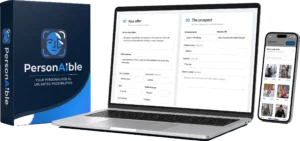
Getting the attention of a potential client is often one of the hardest parts of cold outreach. Generic emails can be easy to ignore, while recording a genuinely personalized video for every prospect can quickly become time-consuming.
PersonAIble approaches that problem by combining personalized AI video creation with business prospecting and outreach tools.
Instead of positioning itself as just another AI avatar generator, PersonAIble is designed around a broader workflow: identify a potential business prospect, create a personalized presentation around that business, generate an AI-presented video that can incorporate the prospect’s website, place it on a shareable page, and then use it for outreach.
But does that make PersonAIble useful for agencies, freelancers and marketers?
In this PersonAIble review 2026, we’ll examine what the software is designed to do, its major features, how the workflow works, pricing considerations, advantages, limitations and who may benefit from it.
Important: PersonAIble can automate parts of the prospecting and video-creation process, but software cannot guarantee replies, clients or income. Results depend on factors including your target market, offer, messaging, follow-up and service quality.
View the Current PersonAIble Offer
What Is PersonAIble?
PersonAIble is an AI-powered personalized video prospecting platform designed primarily for people who sell services to businesses, including freelancers, consultants, marketers and agencies.
The central idea is straightforward.
Traditional personalized video outreach can involve researching a company, studying its website, writing an individual script, recording a video, editing it, uploading it somewhere and then sending the link to the prospect.
PersonAIble attempts to bring much of that workflow together inside one platform.
Its current product materials describe capabilities including:
- Local-business prospect discovery
- AI-generated outreach scripts
- AI presenters
- AI-generated voice
- Prospect website screencasts
- Personalized videos
- Hosted video pages
- Calls to action
- Video engagement tracking
- Outreach and sending tools
The value proposition, therefore, isn’t simply “create an AI video.”
It’s closer to:
Find a prospect → create a personalized presentation → send it → track engagement → follow up.
PersonAIble Review: A Look Inside the Platform
The supplied interface screenshots give us a useful look at how PersonAIble organizes the video outreach workflow.
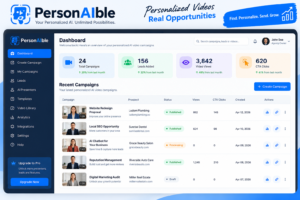
The dashboard is designed around campaigns and personalized videos rather than functioning only as a general-purpose AI video editor.
That distinction matters because the target user appears to be someone conducting business outreach rather than someone simply creating social-media videos.
How Does PersonAIble Work?
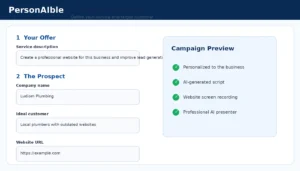
Based on the current product documentation and interface materials, the workflow can be understood in five broad stages.
1. Choose the Service You Want to Sell
Before generating outreach, you need to tell the system what you’re offering.
This could potentially include services such as:
- Website design
- SEO services
- Lead generation
- AI automation
- Chatbot implementation
- Digital marketing
- Reputation management
- Other B2B services
This is an important point that can be lost in the marketing surrounding AI prospecting software.
PersonAIble doesn’t replace the need for a compelling service.
The clearer your audience, problem and offer are, the easier it becomes to create relevant outreach.
2. Define Your Target Customer
The campaign configuration shown in the supplied interface allows the outreach to be built around a defined service and target customer.
This is useful because effective personalization requires more than inserting a company’s name into a generic script.
The message should relate to an actual service and a relevant problem.
3. Configure the AI Message
The interface also provides controls around how the AI-generated message should be created.
Depending on the available configuration, users can provide additional context concerning tone, supporting information and messaging constraints.
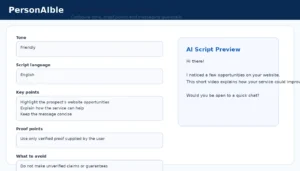
This is particularly useful for agencies because AI-generated sales copy should not be allowed to invent achievements, guarantees or claims about a service.
Users should still review generated scripts before sending them to prospects.
4. Select an AI Presenter
PersonAIble uses virtual presenters so users don’t necessarily have to appear on camera for every personalized prospecting video.
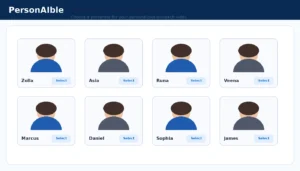
For marketers who dislike recording themselves—or agencies trying to create personalized presentations at greater volume—this may reduce part of the manual production process.
However, an AI presenter does not automatically make an outreach message persuasive. The relevance of the offer and script still matters.
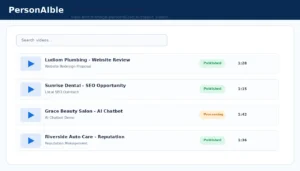
5. Generate and Manage Personalized Videos
Generated videos can then be managed from within the platform.
Website Screencast Personalization
One of PersonAIble’s more distinctive features is its use of the prospect’s website as part of the personalized presentation.
Instead of relying entirely on an AI avatar speaking against a generic background, the system is designed to combine an AI-presented message with a screencast involving the business being approached.
That can make the presentation more specific to the recipient.
For example, a web designer could potentially build outreach around an existing business website, while an AI automation provider could explain a relevant automation opportunity.
There is still an important distinction:
Personalization can help make outreach more relevant, but it doesn’t guarantee the recipient will respond.
Hosted Personalized Video Pages
After generating a presentation, PersonAIble can provide a hosted page that can be shared with the prospect.
Current product documentation indicates these pages can incorporate elements such as branding, the personalized video and a call-to-action.
That can remove the need to manually create a new landing page for every prospect.
Built-In Calls to Action
A personalized video is most useful when the prospect understands what to do next.
Depending on your business, a CTA might direct the prospect to:
- Book a consultation
- Request additional information
- Visit your agency website
- Request a quote
- Schedule a demonstration
- Contact you about the service
The CTA should match the purpose of the outreach rather than pushing every prospect immediately toward a purchase.
Video Tracking and Analytics
The supplied interface materials also show campaign/video statistics associated with engagement.

Tracking can be useful because it gives an outreach campaign more context than simply sending an email and wondering whether the prospect interacted with the presentation.
Analytics still need to be interpreted carefully. A video view or CTA click is an engagement signal—not proof that a prospect will become a paying customer.
PersonAIble Features at a Glance
| Feature | Purpose |
|---|---|
| AI Personalized Videos | Create prospect-specific video presentations. |
| AI Scripts | Assist with creating individualized outreach messaging. |
| Virtual Presenters | Present the message without requiring the user to record every video personally. |
| Website Screencasts | Bring the prospect’s website into the presentation. |
| Business Leads | Help identify businesses that may be relevant prospects. |
| Hosted Pages | Provide shareable destinations for personalized videos. |
| CTA | Give interested prospects a clear next action. |
| Tracking | Provide visibility into engagement with presentations. |
| Sending Tools | Help deliver personalized presentations to prospects. |
Who Could Use PersonAIble?
PersonAIble appears most relevant to people already selling—or planning to sell—services to businesses.
Potential users include:
- Digital marketing agencies
- Freelancers
- SEO professionals
- Web designers
- AI automation consultants
- Lead-generation agencies
- Business consultants
- Reputation-management providers
- Local marketing specialists
The software may be less useful for someone who has not yet decided what service they want to sell.
PersonAIble Pros and Cons
Potential Advantages
- Personalized approach: Videos can be created around individual businesses rather than relying only on generic outreach.
- Multiple tools in one workflow: Lead discovery, scripting, AI presentation, website screencasting, hosting and outreach are designed to work together.
- No camera required: Virtual presenters can reduce the need to personally record each presentation.
- Hosted video pages: Users don’t necessarily need to create a separate landing page for every prospect.
- Tracking: Engagement information can help inform follow-up.
- Commercial use case: The platform is designed around agencies, freelancers and service providers rather than AI video creation for entertainment alone.
Potential Limitations
- It doesn’t guarantee clients: AI can automate parts of outreach but cannot force prospects to respond or purchase.
- You still need a strong offer: Weak positioning remains weak even when presented through an AI video.
- AI output should be reviewed: Automatically generated scripts should be checked for accuracy and inappropriate claims.
- Lead quality matters: Having access to prospects does not mean every business is qualified for your particular service.
- Cold outreach still requires judgment: Users should follow applicable email, privacy and marketing rules.
- Upgrades may increase total cost: Buyers should understand what is included in the core offer before purchasing optional upgrades.
PersonAIble Pricing
Current third-party product information lists the PersonAIble Pro offer at approximately $34.95 as a one-time purchase, while additional upgrades may be offered separately.
Reported optional upgrades include expanded usage, additional AI presenters and enhanced agency branding features.
Pricing warning: JVZoo launch pricing, discounts, upgrades and availability can change. For that reason, the checkout/sales page should be treated as the source for the price available when you purchase.
Check Current PersonAIble Price & Offer
Do You Need the PersonAIble Upgrades?
Not necessarily.
The appropriate version depends on how heavily you plan to use the system.
A freelancer experimenting with personalized outreach to a small number of businesses has different requirements from an agency creating videos at significantly greater volume.
Before purchasing an upgrade, ask:
- How many prospects will I realistically contact?
- Do I need additional AI presenters?
- Do I need stronger agency branding?
- Will the additional feature directly support my outreach strategy?
Buying every upgrade simply because it is available is not automatically the best approach.
Can PersonAIble Really Make Money for You?
This is where our review differs from aggressive promotional claims.
PersonAIble cannot guarantee that you will make money.
The platform can potentially reduce some of the work involved in finding prospects and producing personalized outreach.
Whether that generates revenue depends on variables outside the software, including:
- The market you target
- The problem you’re solving
- Your service
- Your pricing
- Your credibility
- The quality of your outreach
- Your follow-up process
- Your sales ability
- Your ability to deliver what you sell
That is a more realistic way to evaluate any client-acquisition tool.
PersonAIble vs. Doing Personalized Outreach Manually
| Task | Manual Approach | PersonAIble Approach |
|---|---|---|
| Find prospects | Research manually or use another lead tool | Business lead functionality is integrated into the workflow |
| Write script | Write individually | AI-assisted script generation |
| Presenter | Record yourself | AI presenter |
| Website presentation | Screen-record manually | Website screencast workflow |
| Video hosting | Separate hosting platform may be needed | Hosted video page |
| Engagement tracking | Requires separate tracking or tools | Tracking functionality is part of the workflow |
Is PersonAIble Legit?
PersonAIble is a real software product being marketed through JVZoo, with product documentation and interface materials showing an operational workflow around personalized AI video prospecting.
But asking whether software is “legit” should not be confused with asking whether it guarantees profitable results.
Those are different questions.
The product provides tools designed to automate parts of client prospecting. Whether those tools are valuable to you depends on how well they fit your actual business and outreach process.
Who Should Consider PersonAIble?
PersonAIble makes the most sense for someone who already has a relatively clear B2B service and wants to experiment with personalized video as an outreach channel.
For example:
Target: Local dental practices
Problem: Outdated websites
Service: Website redesign
Outreach: Personalized video showing specific website opportunities
Or:
Target: Local service businesses
Problem: No automated website support
Service: AI chatbot implementation
Outreach: Personalized video explaining the potential use case
In those scenarios, PersonAIble becomes an outreach tool supporting an existing offer.
Who Might Want to Skip PersonAIble?
PersonAIble may not be the right fit if you:
- Don’t have a service or offer to sell
- Expect software alone to generate guaranteed income
- Don’t want to conduct prospect outreach
- Prefer personally recorded videos
- Only need a general AI video generator
- Are unwilling to review AI-generated messages before sending them
PersonAIble Review 2026: Frequently Asked Questions
What is PersonAIble?
PersonAIble is an AI-powered personalized video prospecting platform designed to combine business leads, AI-generated messaging, virtual presenters, website screencasts, hosted video pages and outreach tools.
Is PersonAIble just an AI video generator?
No. AI video creation is one component. The broader workflow is designed around finding potential business prospects, creating personalized presentations and using those presentations for outreach.
Do I need to appear on camera?
The platform uses AI presenters, so its core workflow does not require you to personally appear in every generated prospecting video.
Does PersonAIble provide leads?
Current product documentation describes access to local-business prospect data through its lead ecosystem. Access and limits may vary by plan, so verify the current offer before purchasing.
Can PersonAIble guarantee clients?
No. No prospecting software can guarantee that a business will reply, book a meeting or become a paying client.
Can beginners use PersonAIble?
The workflow is designed to reduce some of the technical work involved in creating personalized videos. Beginners still need to understand what service they are offering and which businesses they want to target.
Does PersonAIble create the outreach script?
AI-assisted script and messaging generation are part of the product’s described workflow. Generated copy should still be reviewed before being sent.
Does PersonAIble record the prospect’s website?
Website screencasting is one of the product’s highlighted personalization features.
Does PersonAIble include video tracking?
Current product materials and supplied interface screenshots show engagement-related tracking functionality associated with generated videos.
How much does PersonAIble cost?
Current product information lists PersonAIble Pro at around $34.95 as a one-time purchase, with optional upgrades available separately. Launch pricing can change, so verify the current price through the official checkout.
Is PersonAIble worth considering?
That depends primarily on whether personalized video prospecting fits your client-acquisition strategy. Its integrated workflow may be useful to agencies, freelancers and consultants who already have a defined service and want to reduce the manual work involved in producing individualized outreach.
PersonAIble Review: Final Thoughts
The most interesting part of PersonAIble isn’t simply the use of AI presenters.
There are already many tools capable of generating AI videos.
PersonAIble’s differentiator is the attempt to connect several parts of the prospecting process:
business prospect → personalized message → AI presenter → website screencast → hosted presentation → CTA → outreach → tracking.
For agencies, freelancers and consultants who already know what service they want to sell, consolidating those steps could reduce some repetitive work involved in personalized outreach.
At the same time, realistic expectations matter.
PersonAIble does not eliminate the need for a good offer, relevant targeting, accurate messaging, responsible outreach, follow-up and strong service delivery.
Think of it as a tool for making a personalized outreach process easier to execute—not as an automatic client or income generator.
Visit PersonAIble & Check the Current Offer